
Modelly Studio#
Modelly Studio is a browser app for one model: run it, change its parameters, scrub back
through the run, and see the space, the plots, the agents, the profiler and the linter side by
side. It works with any Modelly model, with no code to write: the parameter panel comes from the
model’s Scenario, the space view from the same drawing code SolaraViz uses.
pip install "modelly-abm[viz]"
modelly studio path/to/model.py:MyModel
The command serves the app on http://127.0.0.1:8765 and opens it in the default browser, on
Windows, macOS and Linux alike. Stop it with Ctrl+C.
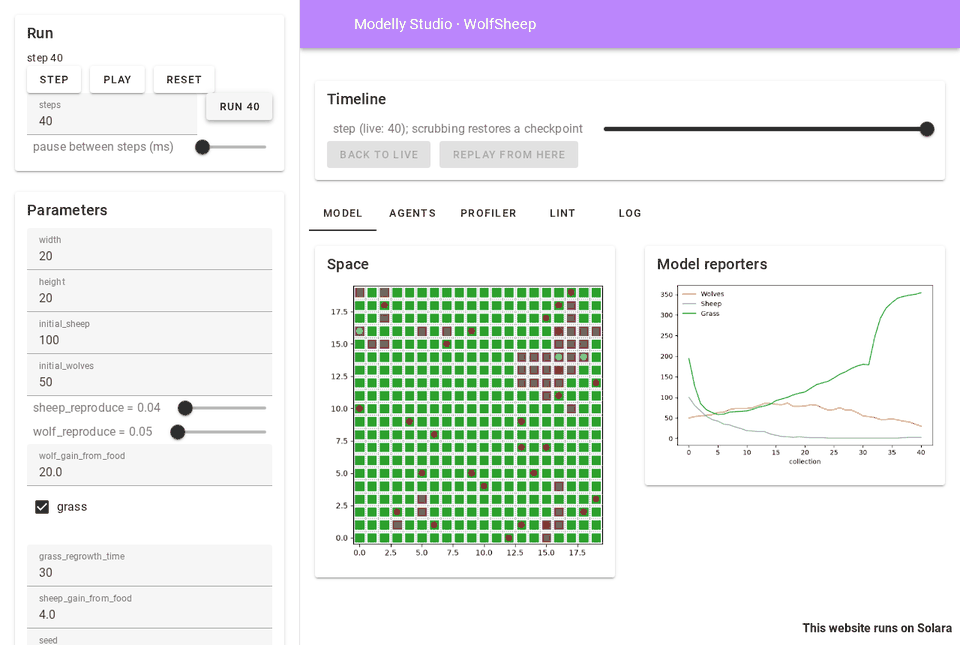
Starting Studio#
modelly studio modelly/examples/advanced/wolf_sheep/model.py:WolfSheep
modelly studio modelly.examples.advanced.wolf_sheep.model:WolfSheep --seed 7
modelly studio model.py:Epidemic --port 8800 --no-browser
modelly studio model.py:Epidemic --portrayal app.py:agent_portrayal
python -m modelly.studio model.py:Epidemic          # the same, without the umbrella command
The target is a file and a class, or a dotted module and a class, as for
modelly profile. A file inside a package (folders with __init__.py) is
imported under its package name, so checkpoints of the model load again later; a loose file is
imported under its own name with its folder on sys.path, so from agents import Sheep next
to it works.
Option |
Meaning |
|---|---|
|
port to serve on (default 8765); |
|
address to listen on (default |
|
do not open the default browser |
|
seed of the first run (default 42) |
|
how agents are drawn: a function returning an |
|
steps between two timeline checkpoints (default 1) |
|
how many of the last steps the profiler panel sums (default 50) |
|
mebibytes the timeline’s checkpoints may take (default 256) |
Exit status: 0 when the server stopped normally, 1 when the model raised while being built, 2 for a bad command line or a target that cannot be found. The model is built once before the server starts, so these errors show in the terminal.
The bundled examples’ app.py files define portrayals Studio can reuse, for example
--portrayal modelly/examples/advanced/wolf_sheep/app.py:wolf_sheep_portrayal. Without one,
each agent class gets its own colour from the colour-blind-safe Okabe-Ito palette.
The panels#
Run (sidebar): Step, Run N steps, Play and Pause, Reset, and the pause between two steps while playing. Play waits for each step to be drawn before taking the next one. An exception raised by the model stops the run and shows under the buttons; the traceback is in the log.
Parameters (sidebar): one input per field of the model’s Scenario, and per keyword
argument with a default of its constructor:
Field |
Input |
|---|---|
|
checkbox |
|
select |
|
slider |
other |
number field |
|
text field |
anything else (tuple, dict, None) |
shown, not editable |
and the seed. With “Restart the run when a value changes” (on by default) a change rebuilds the model at step 0; turn it off to keep the change for Reset, or for Replay from here.
Timeline: a slider over every step of the run so far. Moving it shows the model at that step in every view, the live run going on untouched; Back to live returns to the latest step.
Model: the space (orthogonal and hexagonal grids, networks, continuous space and Voronoi
grids, drawn by SpaceRenderer) and a plot of the DataCollector’s numeric model reporters.
A model without a space or a collector says so instead.
Agents: the first 100 agents by unique_id, one column per attribute (the values
modelly.timetravel.agent_state reads: plain attributes, columns and the cell or position),
filtered by class.
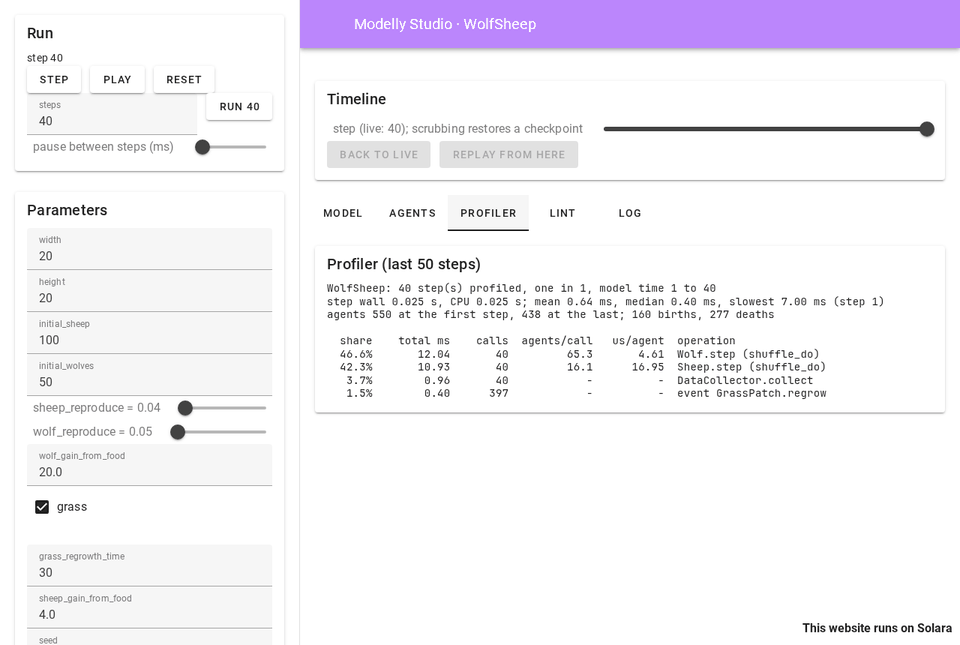
Profiler: modelly profile over the last 50 steps: the costliest operations,
microseconds per agent and the hints. Every step Studio takes is profiled; one session profiles
at a time, since the profiler patches classes for the whole process.
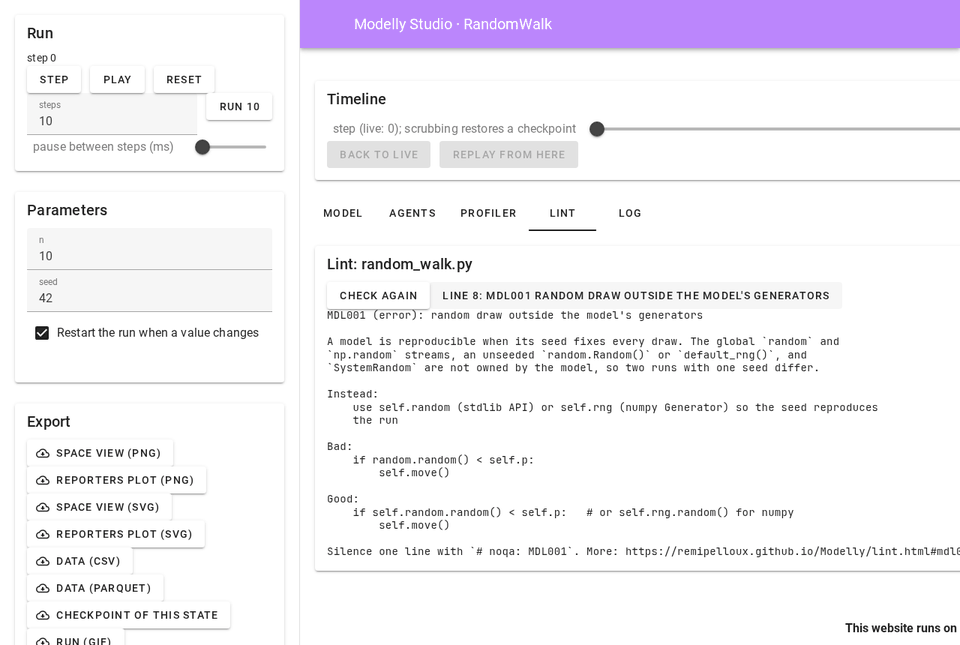
Lint: modelly lint on the model’s file. Each finding is a button; clicking it
shows the rule’s --explain text. Check again re-reads the file after you edit it.
Log: what happened in the run: new runs and their values, replays, errors, and why a model could not be checkpointed.
Export (sidebar): the space view and the reporters plot as PNG or SVG, the collected model
data as CSV (and Parquet when pyarrow is installed), a checkpoint of the state shown (load it
with Model.load), and a GIF of the run’s space view (at most 120 frames, sampled evenly).
Scrubbing and replaying#
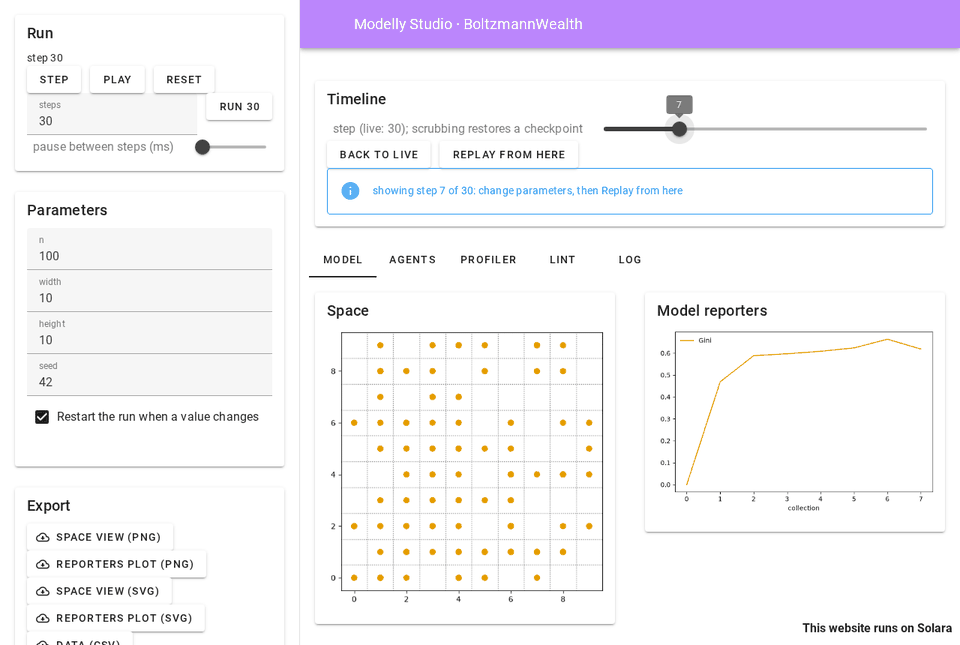
Studio records each run with a modelly.timetravel.Recorder, one checkpoint
per step by default (--every). Scrubbing restores the checkpoint at or before the step and
replays on to it, so the state shown is the one the run had at that step, bit for bit.
To try another future from a step: scrub to it, change parameters (with “Restart the run” off),
and click Replay from here. The scrubbed-to state becomes the live run, with the changed
Scenario values set on its scenario and, when the seed changed, both generators reseeded. What
the time travel guide says holds: code that
reads self.scenario.<name> sees the new value from the next step on, but values the model
copied out of the scenario when it was built keep their old ones, and constructor arguments
(not on the scenario) are not applied, which the log says.
Models that cannot be checkpointed#
A model that holds a lambda (a DataCollector reporter, say), a generator or a class made at
run time cannot be pickled, so it cannot be checkpointed. Studio then replays instead: scrubbing
rebuilds the run from its start with the same parameters and seed and runs it on to the step.
Seeded runs are reproducible, so the state is the same; it only takes longer on long runs. The
log names what could not be saved, and the timeline says “scrubbing replays the run”. Of the
bundled examples, Epstein civil violence, the prisoner’s dilemma grid, Sugarscape, the tram
model and alliance formation replay; the others restore checkpoints. Making their reporters
module-level functions (see checkpoints) makes scrubbing instant.
Platforms and network#
Studio is a Solara app served by uvicorn on your computer and drawn in your browser: there is
nothing OS-specific in it, and paths are handled with pathlib. By default it listens on
127.0.0.1 only, so nothing outside your computer can reach it; --host 0.0.0.0 shares it on
your network, with no authentication, so use that on a network you trust only.
Studio’s own code makes no network request, and Solara’s telemetry is turned off. Solara
fetches a few of its own front-end files (fonts, RequireJS) from its CDN the first time they are
needed and caches them under share/solara/cdn in the environment; on a machine without
internet access, install the solara-assets package once so they are served locally.
Architecture#
Studio is a Solara app, decided for 1.3 over a separate front end: it
reuses the visualisation code of modelly.viz (the portrayal styles, SpaceRenderer and its
Matplotlib backend) rather than duplicating it in JavaScript, runs on Windows, macOS and Linux
with nothing to build, and keeps the model in the same Python process as the panels, so the
profiler, the linter and the recorder see the real objects.
Module |
Role |
|---|---|
|
|
|
the checkpoint recorder, or the replay timeline |
|
the parameter panel’s fields, from the |
|
series, agent table, figures and export files |
|
|
Each browser tab gets its own session. StudioApp(session) renders headless with
solara.render, which is how the test suite opens every bundled example in Studio.
The screenshots on this page were taken headless, with Playwright driving Chromium against
modelly studio.
The API is in Studio.